Drawing
After an update, ay2d_drawables lists the visible meshes back to
front. Draw them in that order.
uint32_t n = ay2d_drawables(m, NULL, 0);   /* ask the count */
ay2d_drawables(m, list, n);                /* fill the list */
for (uint32_t i = 0; i < n; i++) {
    ay2d_drawable *d = &list[i];
    /* bind texture d->texture
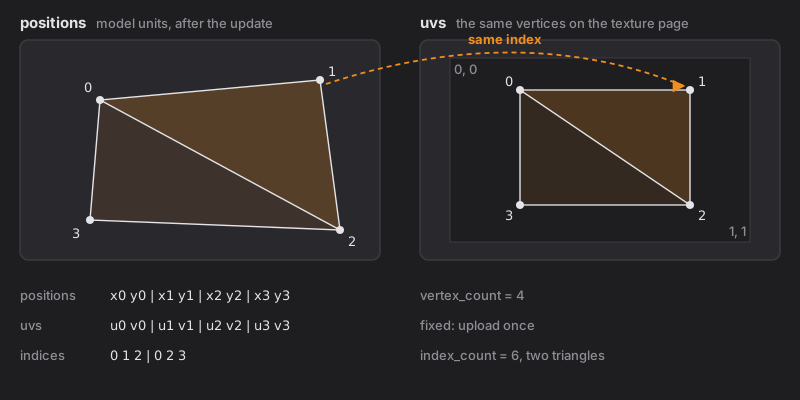
       vertices: d->positions (xy) and d->uvs (uv), d->vertex_count of each
       triangles: d->indices, d->index_count of them (a multiple of 3)
       blend: from d->flags, alpha times d->opacity */
}
Blending
Textures are PNG with straight (not premultiplied) alpha. With color
and alpha from the texture and a = alpha × opacity:
| Flags | Result |
|---|---|
| none | dst = color·a + dst·(1 − a) |
ADDITIVE |
dst = dst + color·a |
MULTIPLICATIVE |
dst = dst·(1 − a) + dst·color·a |
If your renderer works in premultiplied alpha, premultiply the textures at
load and use (one, one-minus-src-alpha) for normal and (one, one) for
additive.
moc3 5.3 blend modes. A model saved for Cubism 5.3 can give a mesh one
of sixteen colour blends (Darken, Screen, Overlay, Soft Light, Hue and the
rest) and an alpha blend (Over, Atop, Out, Conjoint, Disjoint).
ay2d_mesh_blend says which. The flags above stay correct for every mesh:
a 5.3 mode sets the nearest of normal, additive and multiplicative, so a
renderer that only does those three still draws something close. To draw
the 5.3 modes exactly, read what is already drawn under the mesh (copy the
target, or use framebuffer fetch) and mix in the shader with the
W3C Compositing and Blending
formulas. Only meshes with such a mode need it.
Masks
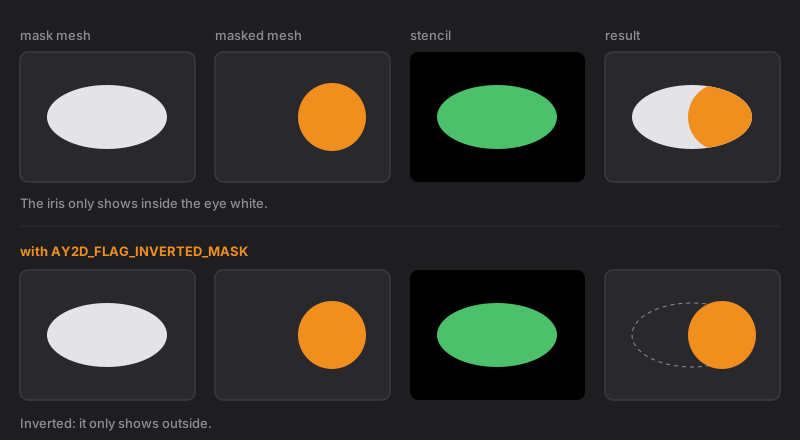
A drawable with mask_count > 0 only shows where its mask meshes have
alpha. Mask meshes are often invisible themselves, so get their geometry
with ay2d_mesh_geometry.
- Draw the mask meshes' alpha into a stencil or a small offscreen target.
- Draw the masked mesh only where that coverage is set.
- With
AY2D_FLAG_INVERTED_MASK, draw only where it is not set.
Several drawables often share the same mask list; group them and render each mask set once per frame.
Culling
AY2D_FLAG_DOUBLE_SIDED means draw both faces. Triangle winding is as
authored and a deformer can flip a mesh over, so most hosts simply turn
culling off.
Framing the model
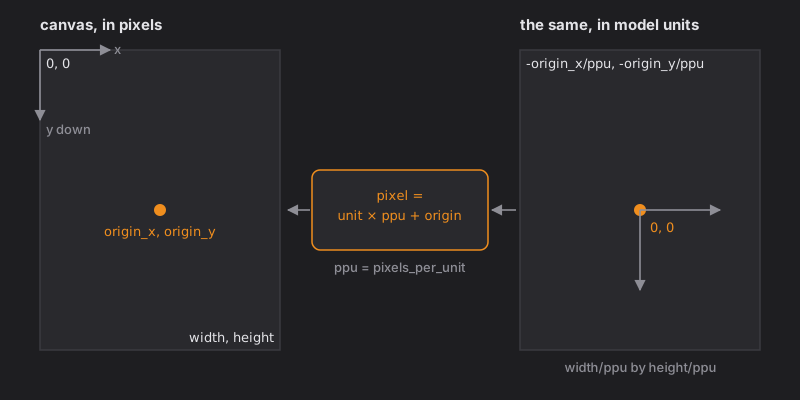
Positions are model units. The authored picture is the canvas rectangle:
| top left | (−origin_x / ppu, −origin_y / ppu) |
| size | width / ppu by height / ppu |
where ppu is pixels_per_unit from ay2d_canvas. Fit that rectangle to
your viewport and the model is framed as it was authored.
Uploading only what moved
ay2d_mesh_changes gives one word of bits per mesh after each update:
| Bit | Meaning |
|---|---|
AY2D_CHANGED_POSITIONS |
the vertices moved: upload positions |
AY2D_CHANGED_VISIBILITY |
the mesh appeared or disappeared |
AY2D_CHANGED_OPACITY |
its opacity changed |
AY2D_CHANGED_ORDER |
its place in the draw order changed |
UVs and triangles never change, so upload those once per mesh. After load every bit is set.